
A variable is a token such as {{first_name}} that is replaced with the right value for each candidate and each sender when the email sends. Use Insert variable in the step editor, or type the token yourself.
Candidate variables
{{first_name}},{{last_name}}: the candidate's name{{job_title}}: their current title{{current_company}}: their current employer
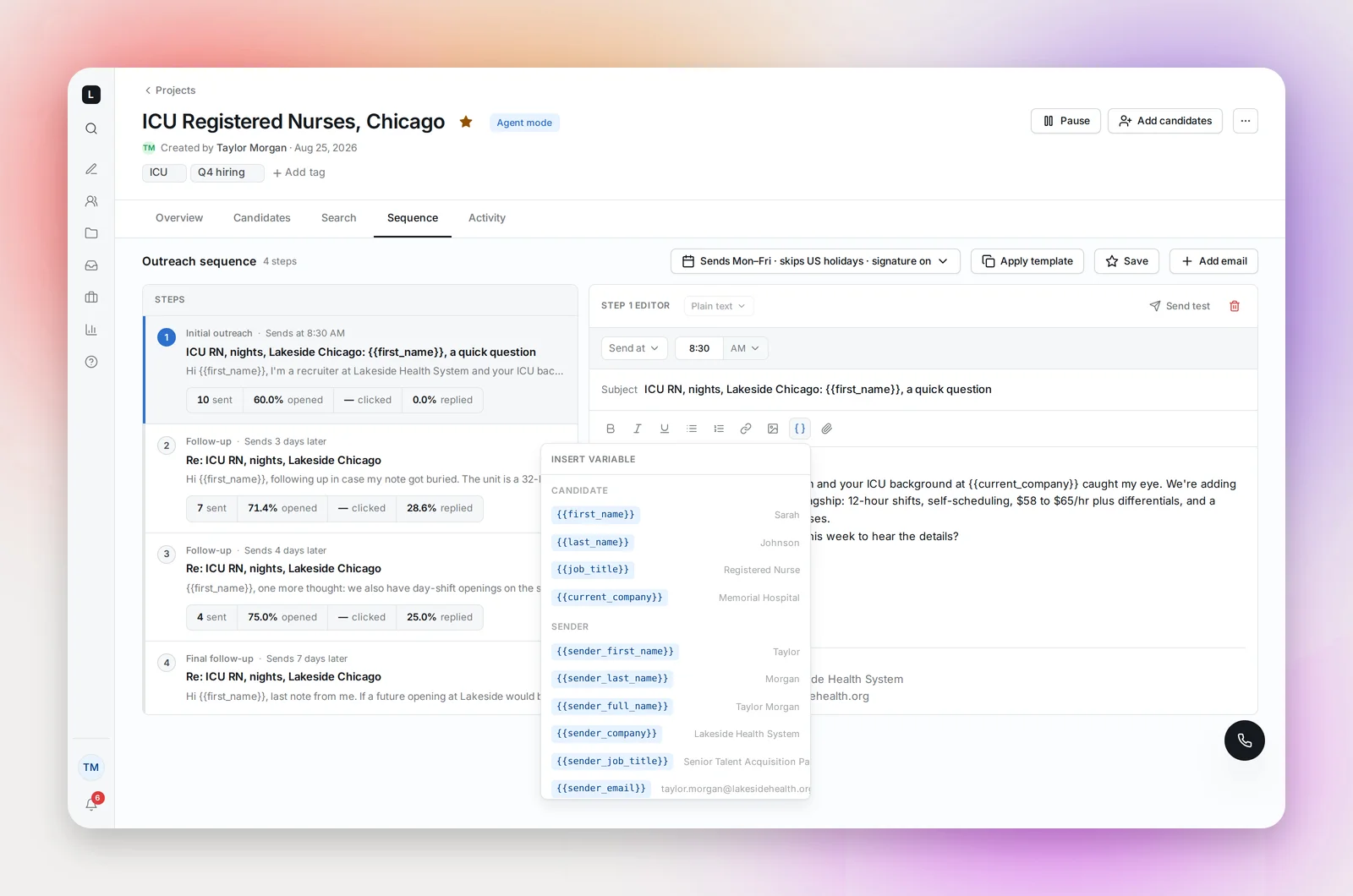
These come from the candidate's profile. Names are cleaned first: credentials and titles such as RN or Dr. at the start or end of a name are left out of the greeting, so "Jane Doe RN" gets "Hi Jane,". Records from your ATS are used as they are. You can correct the title and company in the profile drawer before outreach starts.
Sender variables
{{sender_first_name}},{{sender_last_name}},{{sender_full_name}}{{sender_company}}: your workspace name{{sender_job_title}}and{{sender_phone}}: from Settings → My profile{{sender_email}}: your work email
Sender values are the project owner's, because the email sends from their mailbox. A template shared across the team fills in each recruiter's own details.
When a value is missing
A candidate with no value for a variable still receives the email. The token is filled in as follows:
{{first_name}}becomes "there", so "Hi {{first_name}}," reads "Hi there,".- Every other variable, candidate or sender, becomes blank. "your work at {{current_company}}" would read "your work at ".
So a blank in the candidate's profile never blocks a send; it produces an awkward sentence instead. Before launching, check the Candidates tab for missing titles and companies (the Job title and Company columns), fill in your own job title and phone in Settings, and write sentences that still read well when a value is empty.
Good habits
- Fill in your job title and phone in Settings before using their variables; an empty value leaves a gap in the email.
- Keep
{{first_name}}in the subject line or the first line. It's the single strongest lift in open rate. - Use
{{current_company}}carefully in healthcare: many profiles list a staffing agency or a health system rather than the hospital, so "your work at Kaiser" can read wrong. Prefer the specialty or location from your search. - Send test fills candidate names with your own name and sample values for title and company, so you can see the result.
Frequently asked questions
What if a candidate has no first name?
They still get the email, with "there" in place of the name: "Hi there,". Every other missing variable is left blank.
Can I add my own variables?
The list above is fixed. Put anything else, such as pay range or unit, directly in the text for that project.
Do variables work in templates?
Yes. That's the point of them: the template stays generic and each project and sender fills it in.